Software Release
● GLOBAL LAUNCH | October 2026
TRACES by DG Edge is officially LIVE for all Gran Turismo 7 drivers! Connect your PS5 over Wi-Fi, stream live telemetry, compare lap-by-lap deltas, and access stream overlays in real time. Subscription required for access (Both Web & Application versions)
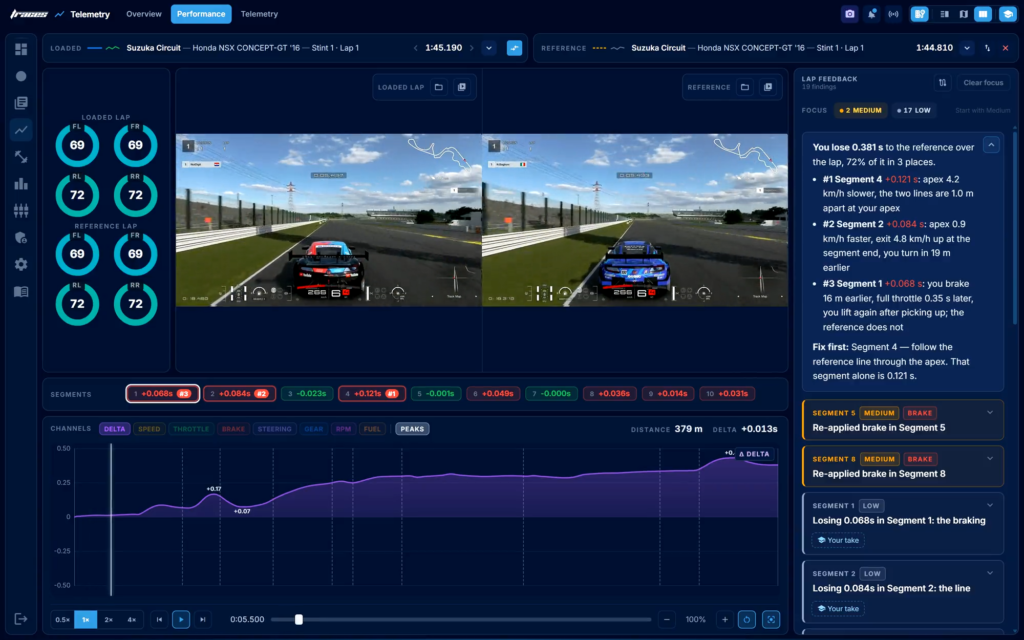
Sim racers, stop guessing where your lap time goes. Today marks a massive milestone for the Gran Turismo 7 community as TRACES officially goes live for everyone. Developed by the team at DG Edge, TRACES is an advanced telemetry analysis suite that dissects your driving input by input, meter by meter, and corner by corner.
Whether you are grinding Daily Race C, chasing world-record time trials, or looking for transparent streaming overlays, TRACES transforms raw UDP console data into clear actionable driving insights.
|
📺 GarageWorks GT Rig Integration
See TRACES Telemetry Live in Action
Watch how we use telemetry traces to dial in line precision, load-cell braking, and lap consistency!
|
Key Features: How TRACES Makes You Faster
|
⏱️ Live Meter-by-Meter Delta
Lap vs. Reference Comparison
Compare your latest lap directly against your best session lap or a saved benchmark. Watch the live time delta curve dip when gaining and climb when giving time back.
|
|
📈 Input Overlay & Rotation Analysis
Brake, Throttle & more Telemetry
Overlay brake pressure, throttle application, coasting zones, and gear selection side-by-side with reference data to catch tire spin and wheel lock instantly.
|
|
🎥 Stream-Ready Overlays
Live Broadcast Widgets
Integrate live browser-source telemetry cards into your streaming Studio. Show steering rotation, tire temperatures, speed, and real-time Driver Rating progression cleanly over gameplay.
|
|
🏁 Deep Session Race Summaries
Segment Splits & Fuel Mapping
Review entire stints on one screen—track lap positions, segments splits, fuel usage per lap, clean stint markings, and export raw CSV data for deeper session logs.
|
|
🌐 Public Laps & Session Sharing
Share Your Telemetry
Publish any session directly to a public web page link. Teammates and rivals can view full telemetry graphs and track maps straight from their browser without installing software.
|
Quick Start: How to Connect TRACES in 3 Steps
- Enable Telemetry in GT7: Turn on GT7’s telemetry stream in the game settings. TRACES automatically detects your PlayStation on the same local Wi-Fi/home network.
- Start Driving: Launch TRACES, join a session, time trial, or Daily Race lobby, and telemetry starts recording the moment you cross the line.
- Analyze & Improve: Instantly view segment deltas, tire temps, and pedal input traces on your PC or browser as you cross the line.
Pricing & Access
TRACES is available as part of the DG Edge Premium tier at €4.99 / month or €49.99 / year. The app supports both steering wheel and controller setups, requiring only a local network connection between your PS5 and PC.
Ready to Unlock Your True Pace?
Stop guessing where you lose time and start analyzing your laps like a pro today.